# Marketo - Bulk import leads from file action
This action bulk imports leads from a file into your Marketo instance. The file should be formatted as a comma, tab, or semi-colon separated values file. Workato will search for existing leads based on a chosen lookup field. Any existing leads found will be updated. Otherwise, new leads will be created from the file data.
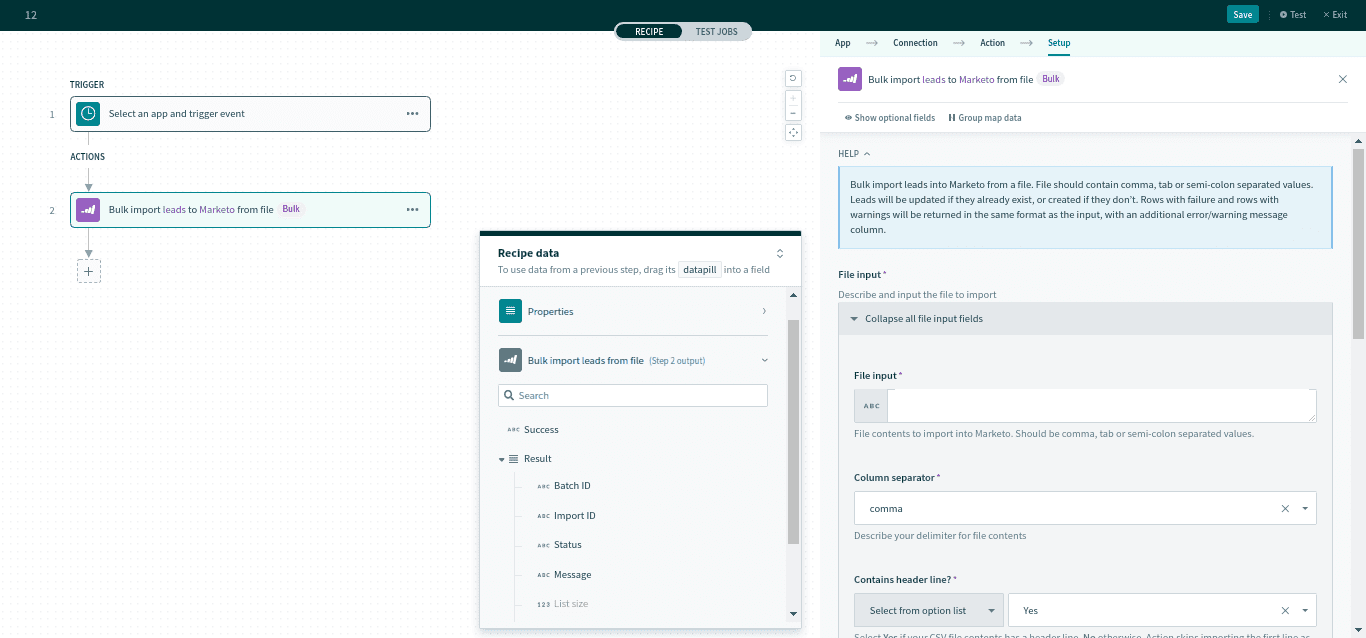 Bulk import leads from file action
# Input
| Input Field | Description | |
|---|---|---|
| File import | File input | The file contents to import to Marketo. This should be formatted as comma, tab, or semi-colon separated values. |
| Column separator | The symbol for the delimiter. | |
| Contains header line? | Whether the input file has a header line. | |
| Column names | The columns names of your input file should correspond to input fields for the Marketo Lead object. You can manually define the column names or use a sample CSV file. | |
| List | If specified, all imported leads will be added to this list. | |
| Lookup field | Workato will inspect this field for existing leads. Existing leads will be updated. | |
| Partition name | If specified, all imported leads will become members of this partition. | |
For a full list of Lead fields, see here (opens new window).
# Output
| Output Field | Description | |
|---|---|---|
| Success | Whether this action was successful. | |
| Results A list of import responses | Batch ID | A unique ID for the batch. |
| Import ID | A unique ID for the import operation. | |
| Status | The status of the batch. | |
| Message | An optional message attached to this import operation. | |
| List Size | The list size of the import response. | |
| List Index | An index for each item in the list of responses. | |
| Number of rows failed | Number of rows failed. | |
| Number of rows with warning | Number of rows with a warning. | |
Last updated: 3/29/2023, 2:00:59 PM