# Configure the Workato SAP connector
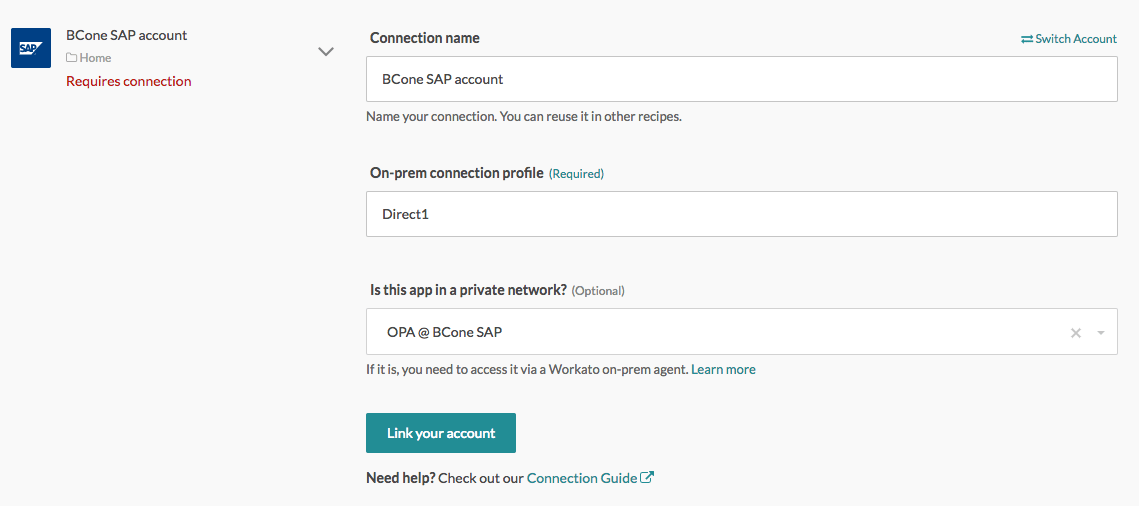
To configure the SAP connector you must create a connection in the Workato UI.
There are two ways to create a connection in Workato. You can select App Connections from the navigation bar and click Create a new connection.
Alternatively, click the Connections tab in the recipe editor with SAP triggers/actions. Then, follow these steps:
1
Select the connector SAP RFC.
2
Input the OPA profile name for SAP you have created in Step 3: Create a SAP profile in OPA, in this case Direct1.
3
Select the OPA name, in this example, OPA @ BCone SAP.
4
Click Link your account. If the connection is successful, you can start building recipes in Workato to talk to SAP.
Last updated: 3/29/2023, 5:51:53 AM